Real-Time Market Intelligence: How Traders Use The Planet's Markets Tab
Markets do not move in isolation. A drone strike in the Gulf moves crude. A surprise hold from a central bank moves currencies and rates. A new round of sanctions reprices shipping, metals and the companies exposed to them.
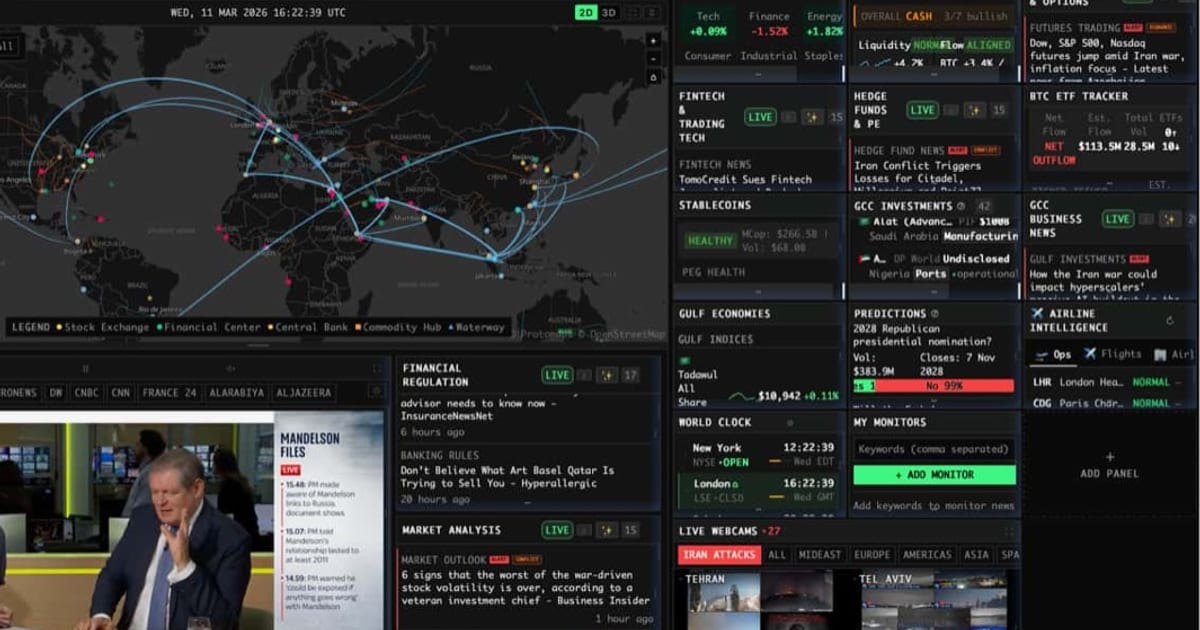
Most market dashboards show you price. The Planet shows price next to the events that drive it. This guide walks through the Markets tab and how traders use it alongside the rest of the app.
The Markets Tab at a Glance
The Markets tab at theplanet.today/app/markets groups panels into a few families. You can add or remove panels with the “Add widgets” button and pin the ones you use most to your own dashboard.
Macro and Rates
- Macro Stress and Macro Indicators: key economic series in one place
- Financial Stress: a read on funding and credit conditions
- Yield Curve: the shape of the curve and how it is changing
- Global Debt Clock: sovereign debt at a glance
- Economic Calendar: upcoming releases and central bank events
- Consumer Prices, FAO Food Price Index, Grocery Index and Big Mac Index: inflation from several angles
Sentiment, Positioning and Breadth
- Fear and Greed and AAII Sentiment: where the crowd sits
- Market Breadth: how broad a move really is
- COT Positioning: CFTC Commitments of Traders data for futures positioning
- Liquidity Shifts and 24/7 Positioning: flows and positioning outside regular hours
- Sector Heatmap: which sectors are leading and lagging
Equities and Events
- Markets: major indices and tracked symbols
- NQ Pulse, NQ Catalysts and NQ News: a Nasdaq-focused view of moves and their drivers
- Earnings Calendar: who reports and when
Commodities and Trade
- Metals and Materials and Gold Intelligence: precious and industrial metals
- Supply Chain: chokepoint status, shipping rates and critical minerals concentration (covered in depth in tracking trade routes, chokepoints and freight costs)
- Sanctions Pressure: where sanctions are tightening
- Gulf Economies and GCC Business News: a regional view of Gulf markets
Prediction Markets
The Predictions panel shows live contracts from Polymarket and Kalshi: the question, the implied probability and the trading volume. Prediction markets are a fast read on how the crowd prices elections, policy decisions and escalation risk. See prediction markets and AI forecasting for how to use them.
Market Radar: A Seven-Signal Risk Read
The Market Radar panel combines seven signals into a single BUY or CASH verdict for Bitcoin risk appetite:
- Liquidity: the 30-day rate of change in the yen
- Flow structure: five-day returns of BTC against QQQ
- Macro regime: QQQ against XLP (growth against defensives) over 20 days
- Technical trend: BTC against its 50-day moving average and 30-day VWAP, plus the Mayer Multiple
- Hash rate: the 30-day change in network hash rate
- Price momentum
- Fear and Greed
The verdict shows how many of the seven are bullish. It is not a trade signal by itself; it is a quick way to see whether the macro backdrop favors risk-on or risk-off positioning before you look at your own setups.
The Geopolitical Edge
What separates The Planet from a pure market dashboard is everything outside the Markets tab.
- When crude spikes, open the Energy tab to check the Hormuz Trade Tracker, Chokepoint Status and the Energy Disruptions Log, then toggle ship traffic and military activity on the map.
- When a currency drops, check the Country Instability Index in the Conflicts tab to see if the country’s score has been rising.
- When defense names rally, look at Force Posture, the Escalation Monitor and AI Strategic Posture across the nine tracked theaters.
- When freight-sensitive stocks move, check the Supply Chain panel for chokepoint disruption and freight index moves.
This cross-checking used to require a research desk. In The Planet, it is a few tab switches. For the conflict side of the picture, see tracking global conflicts in real time.
Crypto Context
Crypto traders get their own tab with crypto prices, a crypto heatmap, DeFi, AI and alt tokens, the BTC ETF Tracker for spot ETF flows, Stablecoins for peg health, and the crypto Fear and Greed Index. Because crypto trades around the clock, the same geopolitical panels that matter for oil and gold often show up first in crypto risk appetite on weekends.
A Trader’s Day With The Planet
Before the open
- Read the overnight headlines in the News tab and check new hotspots on the Live Map.
- Check the Economic Calendar and Earnings Calendar for scheduled risk.
- Glance at Market Radar, Fear and Greed and Financial Stress for the risk backdrop.
- Check the Energy tab if anything happened near a chokepoint or producer.
- Check prediction markets for any event you have exposure to.
During the session
- Keep the News tab or the Intel Feed open for breaking headlines.
- Watch Market Breadth and the Sector Heatmap to see whether a move is broad or narrow.
- Re-check the Country Instability Index when a country-specific story breaks.
After the close
- Review COT Positioning when new data is released.
- Look at the Escalation Monitor and Strategic Risk Overview for anything building over the week.
What Pro Adds
The Planet app is free. Pro ($39.99 per month or $399.99 per year) adds AI and research panels that sit directly on top of the Markets tab:
- Daily Market Brief: a morning brief linking overnight world events to the assets you trade
- AI Market Implications: cards mapping today’s events to tickers, with direction, timeframe and the risk caveat
- Stock Analysis: AI analysis of a stock’s fundamentals, technicals, news flow and insider activity
- Backtesting: test signal-driven strategies on a ticker against buy-and-hold
- SEC Material Events: 8-K filings as they land, such as M&A, executive changes and restatements
- Trade Policy: tariffs, trade barriers and customs data by country
- WSB Ticker Scanner, AI Forecasts and the AI Analyst
See the Pro page for the full list.
Frequently Asked Questions
Is the Markets tab free? Yes. The Markets tab and its live data panels are free. Pro ($39.99 per month or $399.99 per year) unlocks AI and research panels such as the Daily Market Brief, AI Market Implications and Stock Analysis.
How is The Planet different from a traditional market terminal? A traditional terminal focuses on price, fundamentals and news. The Planet puts market data next to live geopolitical intelligence (conflicts, sanctions, energy, shipping and instability scores) so you can see why a market is moving and what might move it next.
Does The Planet give trading signals? No. Panels such as Market Radar summarize conditions, but nothing in The Planet is investment advice. Use it as context for your own process.
Open the Markets tab at theplanet.today/app/markets.